Using Torrentflux with BitTornado from a long time, I always had problems downloading big torrents. I never had been able to download any linux distribution via the BitTorrent network and this is a big trouble for me. In files bigger than 3 GB's, like Fedora or Solaris installation DVD's, always I had a "Torrent died" messahe whe the download reached near 2,5 GB's. And everytime I tried to restart the server returned a bad "Torrent died" after checking the existing data. I deleted the downloaded part but nothing went better.
Now I'm working 600 Km from my home but yesterday nigth I had the same problem, then I deleted the file partially downloaded I tried to restart de download but TorrentFlux said the same and I decided to search some information. The TorrentFlux website says nothing about upgrades and nothing related in the its forums. Then I went to the BitTornado webpage I there is a new release: 0.3.18.
The release information doesn't say anything about bug fixes, only encryption upgrade but happiness now I can restart my failed download. Only some days waiting for to see if I have a good end of my torrent file.
To upgrade BitTornado I downloaded the .tar.gz file in my laptop, uncompressed it and moved to the server the files used by TorrentFlux: two files .py in the TFBitTornado folder and then all the CVS folder. Then I rebooted the server.
Nothing more today, I need hollidays... too much work now...
Maybe the problem is my server. The Cobalt RaQ 4 is running the old CobaltOS and needs update to CentOS + BlueQuartz... I'll see.
Sunday, March 9, 2008


Tuesday, March 4, 2008
One month later... One more RaQ4

OK. I have a lot of work in my job and I can't dedicate a lot of time to my servers but... I can't be quiet. I bid on one more Cobalt RaQ 4i two weekends ago and it came here last friday. The seller said it has no hard disk and a lot of screws were lost. He didn't guarantee that te Cobalt runs but after installing an old Maxtor 40Gb, I installed the Cobalt software without problems. The best of all is This new RaQ had been very very cheap!!!!!

First I installed the Zeffies special restore CD and his Turbo Updates but some of the packages didn't want to install and this restore CD only detects 8GB-more or less- of the 40GB disk. Later I was thinking how this machine can serve files via SMB and I decided to install the Qube3 OS. Oohhhhh! This OS is beatiful and I think it is a lot faster then the old one.
I like the BlueLinq update system but it has a big fault: There is not a button to install everything with only one press, and I spent one day installing packages. Oh yes, the package Qube3-All-Security-4.0.1-17041 don't want to install.

Now I have a lot of work playing with this new software but I'm thinking to use this as first server and use the other Cobalt RaQ 4i as development system.
Here you have a picture of my servers - Ouch, yes, I have a new Extreme Networks switch-. maybe the next thing to do is find a place for all, a cabinet perhaps?

Monday, February 4, 2008
Finally, I have a Solaris machine
Yesssss. Here it is. A Sunfire V120 arrived last week. I spent all the weekend installing and configuring Solaris 10 and the Java Web Server.
 My first idea was to run this machine as redirector or Reverse Proxy but it's noisy as the my Gigabyte server... I have to buy a lot of new slow fans!!!!


My first idea was to run this machine as redirector or Reverse Proxy but it's noisy as the my Gigabyte server... I have to buy a lot of new slow fans!!!!After the installation of the last release of Solaris 10 for Sparc I'm very impressed with the Sun webserver software, the configuration page via web site is fantastic and it has a wide quantity of options to configure the server. But there is a new things to learn and I need some time to know how works this server software.
In the other hand, the Webconsole software -included in the Solaris package- is really a good idea but now I can only manage ZFS and I don't need it. I'm going to install the Webmin Solaris package and try.
I have to say Solaris is more different from linux than I was thinking, big diferences in console commands and file structures makes me headaches to find some configuration files and, the installation path of some applications are very inconsistent: I have the webserver on /sun/webserver7/, and the webconsole in /usr/share/webconsole/. The freeware of the Companion DVD is in another place and I can't remember everything. Maybe with some work.....
Also, I miss some usefull tools from linux like wget. I downloaded it from ftp://ftp.sunfreeware.com/ but after installation I received a message saying I need some libraries to get it running. This is not a big trouble but some extra work is needed to do some jobs that were very easy with the linux of my Cobalt Raq. Maybe Solaris has it's own tools for the same job but I can't find any list of the equivalent commands and the existance of some freeware makes me doubt about the existance of this list itself.
Here you have some pictures of this hard weekend:
Saturday, January 12, 2008
My Intranet DNS server
My home network is growing fast now with new servers, old PC's and new workstations. Now, I can't remember all my IP addresses and with Unix systems I can't use smb names. The solutions is easy and widely discussed: I need a DNS server.
The machine to runs DNS is easy to choose: my Cobalt RaQ4 is 24/7 up. The procedure is easy, and you can download the RaqTweak.com HOWTO. In my case, due this is a local network I simplified a lot the configuration.
Log in the admin panel and go to the Control Panel:
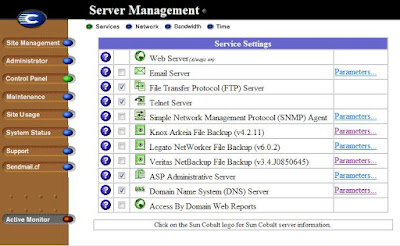
Click on the DNS Server Parameters to open the configuration screen and select Server Settings. Type your usual DNS servers, ask your DSL provider if don't know, as Forwarders servers. Our new intranet DNS server will redirect us to that servers in case of an Internet address translation.
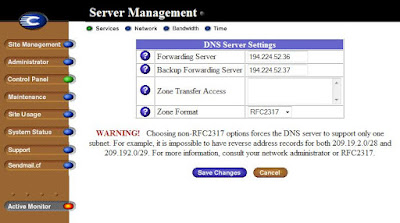
The machine to runs DNS is easy to choose: my Cobalt RaQ4 is 24/7 up. The procedure is easy, and you can download the RaqTweak.com HOWTO. In my case, due this is a local network I simplified a lot the configuration.
Log in the admin panel and go to the Control Panel:
Click on the DNS Server Parameters to open the configuration screen and select Server Settings. Type your usual DNS servers, ask your DSL provider if don't know, as Forwarders servers. Our new intranet DNS server will redirect us to that servers in case of an Internet address translation.
Then select Address (A) record in the combo box and type the name you want for the network item and the domain name, here I use only home as domain name:

Now you only need to repeat this procedure with all the addresses of the net to access to them with names like router.home, webserver.home or films.home. Remember to add the ip address of your new DNS server to the network configuration of your computers, or better, put this in your DHCP server or router.
The next thing I need is a Reverse Proxy and some kind of ssh redirector because I have more than 2 webservers in my net and I need to access to them from everywhere without a VPN.
Monday, December 31, 2007
Upgrading Python
Looking at the Torrentflux requisites there is one that a full upgraded Cobalt OS 6 doesn't have: Python release 2.2 or greater. The OS of a Cobalt RaQ 4 only has Python 1.5.3. I don't know why but I downloaded Python 2.2.3 sources (maybe I can use a newer release, I'll try later) from the Python RPM page. I downloaded the Redhat special version.
This time not tar zxvf, the command is rpm -i python-2.2.3-26.src.rpm, and then the sources must be located in the /usr/src/redhat/sources/Python-2.2.3 folder. You know... change to that folder and be root: cd /usr/src/redhat/sources/Python-2.2.3, then type su and intro the root/admin password.
After this you can do the usual compilation/installation from sources:
1 ./configure
2 ./make
3 ./make install
Now the executable is /usr/local/bin/python. In the case of the Cobalt OS we need this file in /usr/bin: cd /usr/local/bin, cp python2.2 /usr/bin/python2.2, cd /usr/bin, cp python2.2 python. The last command overwrites the old executable (it remains as python1.5).
The last thing to do is reboot the server and ...... voilà.
Installing the no-ip client
I don't have static IP from my Internet provider, so I need use a Dynamic DNS server system to access my servers from everywhere I go. There is two major service providers: DynDNS and No-Ip.com. Some time ago I used the No-ip service in another project and I tried this now for hat reason and because I like its web interface (No tests with DynDNS are made but...). First decision made here comes the second: In what server install the client software? EASY, in the Cobalt RaQ 4... low power needed to run and usually it's running 24/7.
The process is very easy:
- Download the client software to te Cobalt appliance. In my case I download it with my workstation and then used FTP to put the file in the admin folder, but there is a beter and faster command to do: log as admin with any telnet client and the write wget http://www.no-ip.com/client/linux/noip-duc-linux.tar.gz,
- Uncompress the file. Write tar zxvf noip-duc-linux.tar.gz and press enter. Now you have a new folder called noip-2.1.7 -Obviously the numbers can change with a new release of the client-. go into the new folder with cd noip-2.1.7.
- Compile the client program. First you need become root user. Type su and press enter. You will be asked for the password, this password is the same as the admin one. The prompt must chage from $ to #. This means you are root and you can do everything, including deleting something important and crash the sever. Now type make and press enter, the server is compiling the software.
- Installing and configuring. When the compilation is done, type make install. Now the software is being copied to the destination folder -/usr/local/bin- and then the configuration wizard starts: it asks for your No-ip.com account user id and password, if you want to update all the existing domains or subdomains (in my case YES), and the time of check the domains.
- Starting the daemon at boot. First we need a script to turn the daemon ON, OFF and RESTART. With the client there is a script -redhat.noip.sh- that is ready to use. Copy it to the folder cp redhat.noip.sh /etc/rc.d/init.d/noip and make it executable: chmod +x noip. Now we need to link the script in the runlevel folders (3 is the default runlevel when the server is running, 6 is for reboot and 0 for HALT status):
# ln -s noip /etc/rc3.d/S99noip
# ln -s noip /etc/rc6.d/K99noip
# ln -s noip /etc/rc0.d/K99noip
And that's all.
P.D.: One question: Why I need to see my server from outside my home?....... to check how my torrents are going with torrentflux!!!!!!!
Links:
No-ip.com linux download page: http://www.no-ip.com/downloads.php?page=linux
The Newbie's Guide to the No-IP™ Linux Client: http://www.no-ip.com/support/guides/update_clients/setting_up_linux_update_client.html
Saturday, December 15, 2007
System OS's
The last three nights I was installing the System OS in the Cobalt. The first attempt was with the original Restore CD shipped with the appliance. It went well and fast and I played some time with this fantastic GUI. Unfortunately the OS only recognized 4GB of my 40GB harddisk, it is a common fault with old cd's and can be arranged restoring with a newer disc.
The next day -wednesday- I tried the Zeffie's Restore CD. It started OK but freezed when the Checking disk... messaged apeared. At this point I turned off the RaQ4: BIG MISTAKE, I explain later. The last attempt was with the last Sun Restore CD available and it was, as the first disc, easy and fast to install. What a luck that I keep an old 3Com PCMCIA card in one of desks!!!
Then, thursday and friday, I spent my time uploading all the patches availables to the Cobalt. It was easy and fast at the start but when more patches were installed, more time needs the server to boot -like Windows ;D-. In one of this reboots I saw a message for a long time in the LCD, and then the servers start to run: Checking disk..., here I discovered my fault, the server was not freezed with the other cd, it was checking something and maybe it is checking the RAID system. Another message: RAID status OK, wouw!!! a need another disk to check. 72 Patches were installed, 54 are the original Cobalt Networks and Sun patches and the rest are a Zeffies creations.
In the Zeffie website, as a lot more like Raqport.com, Nuonce, Raqtweak or Solarspeed, is some newer packages but only paying the remote installing service (no download available). The next time I want to check the new OS from RackStar (Raqtweak) and Strongbold. Both OS are modified BlueQuartz GUI and a linux system OS, Fedora for RackStar and CentOS for Strongbold. There are ISO downloads and also normal PC's releases. For the CentOS+Bluequartz flavour, the download is available in NuOnce Networks. I will try RackStar (its free as NuOnce download) in my Gigabyte server, but Strongbold has to be paid because the efforts they did with the Cobalt installer (?).
Yesterday night I uploaded some more free packages (PKG):
The next day -wednesday- I tried the Zeffie's Restore CD. It started OK but freezed when the Checking disk... messaged apeared. At this point I turned off the RaQ4: BIG MISTAKE, I explain later. The last attempt was with the last Sun Restore CD available and it was, as the first disc, easy and fast to install. What a luck that I keep an old 3Com PCMCIA card in one of desks!!!
Then, thursday and friday, I spent my time uploading all the patches availables to the Cobalt. It was easy and fast at the start but when more patches were installed, more time needs the server to boot -like Windows ;D-. In one of this reboots I saw a message for a long time in the LCD, and then the servers start to run: Checking disk..., here I discovered my fault, the server was not freezed with the other cd, it was checking something and maybe it is checking the RAID system. Another message: RAID status OK, wouw!!! a need another disk to check. 72 Patches were installed, 54 are the original Cobalt Networks and Sun patches and the rest are a Zeffies creations.
In the Zeffie website, as a lot more like Raqport.com, Nuonce, Raqtweak or Solarspeed, is some newer packages but only paying the remote installing service (no download available). The next time I want to check the new OS from RackStar (Raqtweak) and Strongbold. Both OS are modified BlueQuartz GUI and a linux system OS, Fedora for RackStar and CentOS for Strongbold. There are ISO downloads and also normal PC's releases. For the CentOS+Bluequartz flavour, the download is available in NuOnce Networks. I will try RackStar (its free as NuOnce download) in my Gigabyte server, but Strongbold has to be paid because the efforts they did with the Cobalt installer (?).
Yesterday night I uploaded some more free packages (PKG):
- phpMyAdmin 2.2.6 & Midnigth Commader 4.5 .- I know these are very old releases but it's a good point to sart playing with this system. Unfortunately the phpMyAdmin package doesn't make new items in the Cobalt GUI and only can be used adding /phpmyadmin to the site address. These PKG's can be downloaded from Raqport.com.
- AWStats 6.1 .- Also an old PKG of this fantastic tool. Obtained from NuOnce it has some troubles when running the log script, permission problems, and I have to take a look to the instructions but seems to run OK, this is nothing important and I check later. Also from that web site I downloaded OpenWebmail, I installed it but not used.
Really, I'm impressed with the easy to use feeling of this appliance, the first Qube was introduced 10 years ago when PHP and databases were not well developed to web serve purposes.... God Job guys!!!
Subscribe to:
Posts (Atom)


 Posts
Posts

